





The recent rise of remote working has brought us great advantages, such as savings on transport costs or greater ease in balancing family and work life. However, it has indirectly given rise to new risks for companies.
One of the most significant risks is that the working environment changes. The tools that used to be inside the organization’s perimeter and were consumed centrally when we were away (through VPNs, for example) are no longer there.
This opens up a world of possibilities for companies, but also for attackers. We have lost control of the network we connect from. Is our home network secure? Is the network we use in a hotel secure? What about the one in the coworking space?
Well, although there are some exceptions, the answer is no. Most of them are not secure because they were not designed to be.
Therefore, if we are not careful, we are giving the attacker one more entry vector to use to obtain our credentials or carry out some malicious act that could compromise the information we use.
It is not the aim of this article to go into a great level of technical detail, but rather to shed some light on the techniques and procedures attackers use so that we know how to recognize suspicious situations and take measures to avoid this type of attack.
Evil Twin Attack
Those who travel for work will know that there are many occasions when we have to send an urgent report or connect to our email to reply to a message in situations of need, and we look for a connection that solves the problem for us.
We arrive, sit down at a table in the train station café and look for the Wi-Fi network we know exists. We look at the network name and it doesn’t seem suspicious at all. What’s more, since we are regulars, we even know the name of the network. We connect to the network, do what we had planned, drink our coffee and leave.
But did we really connect to the café’s network? Well, perhaps the answer is no.
The Evil Twin attack consists of creating an access point controlled by an attacker with a very similar name — identical to the original, or an eye-catching name depending on the context we find ourselves in. No one will be surprised if, at an airport, we find a Wi-Fi called “airport-WIFI”, “airport-Clients” or something similar.
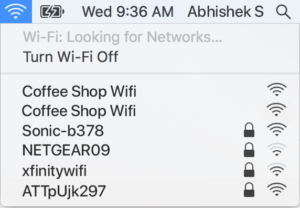
However, this connection will be controlled by an attacker whose goal is to trick us into connecting to that network and steal our credentials for a service through a phishing attack, or to exploit a vulnerability in our device to infect it with persistent malware so as to later have control over it, for example.
Another technique widely used by attackers consists of taking advantage of a design flaw in many access points. Even if we connect to a legitimate Wi-Fi, an attacker could force our connection to drop through a deauth attack, or deauthentication attack.
Once the attacker has managed to get the access point to expel us, they will try to trick us into connecting to one they control, attempting to copy the Wi-Fi network name and other details that will not arouse our suspicion.
To avoid becoming victims, we should check whether there is any duplicate network before connecting to any Wi-Fi network. There are also more advanced options, such as enabling the management frame protection feature.
How can we protect ourselves?
- If we have doubts about the legitimacy of an access point, it is better not to connect.
- Try to use our mobile connection by creating a hotspot (tethering).
Man in the Middle
The attack we saw earlier, Evil Twin, could be grouped within Man in the Middle (MITM) attacks. In this type of attack, there is an intermediate actor between our device and the Internet gateway.
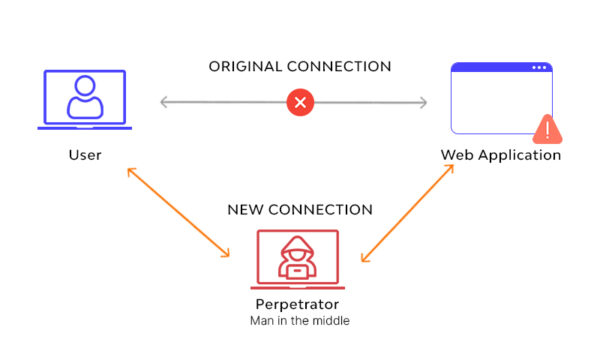
This leads us to two scenarios: the attacker only reads the information and stores it, or modifies it — this second type of attack being the most dangerous.
- Without altering the information: The attacker receives the information from the sender and forwards it to the recipient, obtaining the data of interest to them: service passwords, corporate data, etc.
- Altering the information: The attacker receives the information from the sender, modifies it as they see fit and sends it (or not) to the recipient. This is a dangerous case, as scenarios may arise in which the message is not delivered and the recipient never receives it, in which it is sent to another person, or in which erroneous data is sent.
Nowadays, this attack is possible on services that are not protected by an in-transit encryption mechanism, such as HTTPS, or that use weak encryption. Fortunately, fewer and fewer.
How can we protect ourselves?
- Do not use unencrypted services. On Internet services, always check the browser to make sure it includes a valid certificate (HTTPS).
- Whenever possible, connect through a secure VPN. A free VPN is not always what it seems; they may be monitoring the connection to carry out an attack like the one we saw earlier.
Malware Infection
Earlier, we mentioned that if our device is connected to a malicious network and is not properly updated and has some vulnerability, they can take control of our device.
However, in a home environment our corporate device coexists with other devices that, as a general rule, are not as well protected.
Many cases were seen during the pandemic, when it was necessary to connect work devices to our home networks, in which IT teams received an unusual number of alerts from infected home devices trying to access corporate devices in search of shared resources, open ports within the equipment, etc. Perhaps we don’t know who else connects to our network; a neighbor, a malicious attacker, etc.
It is also not a good idea to download or install anything from a public network, since the attacker could trick our device into downloading a malicious file instead of the original one.
There are services, such as virustotal, that allow us to upload dubious files so they can be analyzed with practically all the antivirus engines on the market (in the example in the image below, 68 antivirus engines) and tell us how many of them determine that the file is malicious and how many detect nothing.
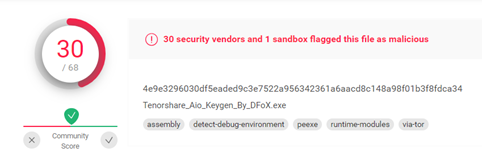
Before installing any program, it is good practice to use this type of service.
Shoulder Surfing
We must not neglect the less technical side of these types of attacks. When we share a train seat with another person, in a café or in other situations of this kind, we have to be careful and discreet with the information we have on screen or are typing.
This is what is known as Shoulder Surfing, a social engineering method aimed at obtaining device unlock patterns, reading emails, etc.

We must be especially careful when sharing sensitive data, such as banking details. Imagine an online purchase by someone who knows the victim and who, being right next to them, can obtain all the details of that card.
To ensure our security on public networks, we must not focus solely on the technical side.
How can we protect ourselves?
- Before logging in to any site, make sure HTTPS is used.
- Turn off Wi-Fi if you are not using it.
- Do not access sites with confidential or banking information.
- Make sure you have disabled file and printer sharing.
- If you have logged in to a website, make sure you log out before leaving.
- Keep your devices updated.
- Use up-to-date antivirus software. Some antivirus programs will be able to detect and stop network attacks such as ARP Spoofing, which are used to carry out Man in the Middle attacks.
- Use a trusted VPN. Be careful with free VPNs.
- Connect to the Internet using your mobile data if you can.
Conclusions
When we connect to a Wi-Fi network in a public place, we are connecting to an infrastructure we don’t know. Behind that connection there may be configuration errors or malicious attackers who can steal our information through various vulnerabilities. Try to connect while following the advice we have given you.