



The concept of a password was developed to help users control access to a resource they do not want to share, primarily information. Passwords are the main barrier that prevents a malicious actor from accessing our social networks, emails or other services such as online commerce.
Because they perform such a critical function, cybercriminals will try to obtain them by any means possible. In April 2021, Facebook was the victim of a leak affecting 500 million users; the leaked information included email addresses, dates of birth, phone numbers and the geographic location of the individuals.
In 2014, Forbes was the victim of an attack by the Syrian Electronic Army; the data of 1 million users was leaked, and the victims’ passwords were also published.
There are numerous cases of attacks like these, which is why it is vitally important to take a series of precautions when setting up our passwords in order to reduce risks, especially when it comes to services open to the Internet.
1. Use strong passwords
Using passwords poses several problems for users, since they can be difficult to remember. A very widespread practice is the use of insecure passwords because they are easy to remember, such as the name of a pet or a date that is important to us.
If we use a password that is easy to guess, it is very likely that an attacker will end up gaining access to our accounts; to prevent this we should become familiar with the concept of secure passwords.
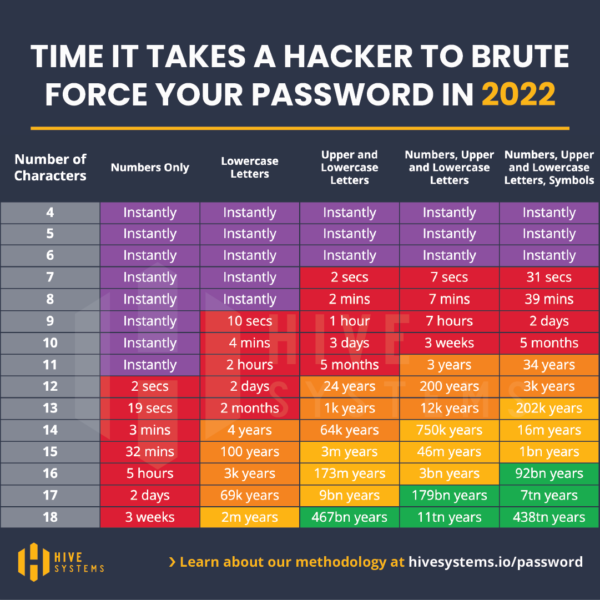
A strong password is one that is hard to discover for an attacker. We should use passwords with a length of more than 12 characters, made up of numbers, uppercase letters, lowercase letters and symbols.
The reason for using passwords with these characteristics is that computers are becoming more and more powerful, and an attacker will be able to try every possible combination until finding the correct one. This is what is known as a brute-force attack.
For example, a 6-character password such as “patata” could be discovered almost instantly. Whereas a 12-character one using a mix of numbers, uppercase letters, lowercase letters and symbols could take up to 34,000 years. Below is a table that illustrates this example, taking into account the number of characters and their complexity.
2. Reusing passwords is a terrible idea
Who hasn’t used the same password on several sites? This is one of the most common mistakes we make when we prioritize convenience over security. It is difficult to work every day with dozens of different passwords that are also strong.
Many users end up using the same password for several services. This is a terrible practice from a cybersecurity standpoint. It can create a domino effect if the password is discovered, completely compromising our online identity and even affecting us financially.
If a website we had registered on suffers a data breach, it is very likely that the cybercriminal will try to log in to our email, social networks or e-commerce services with the data they have just obtained.
The attacker could gain access to all the accounts where we have reused that password, and use them to spread malware to our contacts or buy something with the payment details we have saved.
To help us address this issue, we should use password managers, such as LastPass, Keeper or KeePass. This way we will have different, strong passwords, and we won’t have to remember them all.
3. Use 2FA whenever possible
2FA, also known as two-step authentication, is a security mechanism that adds an extra layer of protection.
Nowadays most services offer support for the use of multiple authentication factors, and it is highly recommended that we use them. Thanks to this security measure, if we want to log in to an account we will need to know the password and something more.
Even if we follow best practices for using passwords on the Internet, we can still be hacked. So if, in addition to needing the password to log in, we also need a code sent to our mobile phone, we are adding another layer of security that significantly hinders the attack.
Despite this, we should be aware that using 2FA does not fully guarantee our security; we must always stay alert. Attacks are becoming more sophisticated, and they will try to trick users into providing that code.
A common example of these attacks is the sending of fraudulent messages informing us about a supposed malicious login, or that a package due to arrive, for example, has been held. The user will believe the message was sent legitimately and will click the link that appears in it. Without knowing it, the victim could provide the password and the 2FA code to the attacker.
4. Check whether you have been the victim of a data breach
Another problem we will encounter is knowing whether any of our credentials may have been leaked on the Internet. We should use services such as Have I Been Pwned to help us assess the security of our credentials.
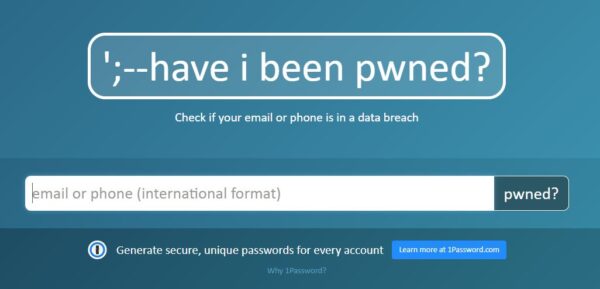
Using this service allows us to act quickly to prevent an attacker from compromising our accounts. We recommend using the “Notify me” feature so that, if we are affected, we are alerted immediately by email.
5. Protect yourself from Malware and Phishing
Cybercriminals can also use phishing and viruses to obtain our passwords.
When we receive a message in our email, we must avoid providing information that could put our identity at risk, and we should not click on links or open any attachment we are not expecting.
To mitigate the risks arising from phishing and malware, we recommend using up-to-date antivirus software and keeping both the operating system and the software we use updated.
A typical example, which we all surely know, is bank phishing via SMS.
We receive the following SMS which, in theory, comes from our bank.

The message informs us about an unauthorized login to our bank account, and asks us to access the link IMMEDIATELY to confirm or deny that it was us. If we are not familiar with this type of malicious technique, it is very easy to become alarmed and click on the link.
During the process, we are sent to a website that impersonates our bank and asks for our credentials.
If we are careless, we could hand our banking credentials to a cybercriminal.
Conclusions
Passwords are the lock on our online services. The harder they are to guess and the more careful we are when using them (not sharing them with anyone, storing them in a secure environment, using different passwords, etc.), the safer they will be to use.
Cybercriminals know how important they are, which is why they use increasingly sophisticated means to steal our digital identity and impersonate us. We should always have a second authentication factor and use methods that make identity theft more difficult.
And you, how do you protect your credentials?